
Best Laptops Under ₹30,000 in India (2026)

TechWeu is a participant in the Amazon Associates Programme. We earn a small commission when you buy through our links, at no extra cost to you. This never affects our rankings — we recommend what we would actually buy.
Searching for the best laptops under ₹30,000 in India? The honest answer is that the brand-new Windows laptop is the weakest of your three options at this price, and the data below shows why.
I’ll be blunt about what I found: at ₹30,000, the brand-new Windows laptop is the worst of your three options. Not a controversial take once you see what’s actually on the shelf — a 2019-era dual-core chip running an operating system it isn’t officially certified for, versus a refurbished business laptop with twice the cores, or a Chromebook with a better screen than laptops costing ₹50,000.
Most guides at this price pretend there’s a great new Windows machine here and pick one anyway. There isn’t. What there is, if you know where to look, is genuinely good value — it just doesn’t come in the shape you expected.
Best laptops under 30000: the 60-second answer
- Best overall — a refurbished Lenovo ThinkPad T490: a 4-core Core i5, 8GB, 512GB SSD and a business-grade keyboard for around ₹26,000. More laptop than anything new at this price, with real caveats you must read.
- Best new machine — ASUS Chromebook CM1405 (14″): ~₹21,000, a 300-nit Full HD anti-glare panel, USB-C charging and display out. Genuinely well-built. Only buy if you understand what ChromeOS can’t do.
- Best big screen — ASUS Chromebook CM1505 (15.6″): the same machine grown, with 128GB storage.
- Actively avoid: new no-name Windows laptops with Celeron N4020 chips. Details below — this one matters.
Why the new Windows laptop lost
Here is the machine the ₹30,000 Windows market is currently offering: a 15.6-inch FHD IPS laptop with 8GB of RAM, a 256GB SSD, Windows 11, and an Intel Celeron N4020.
That chip has two cores and two threads. It launched in 2019 on Gemini Lake Refresh. There is no simultaneous multithreading, no efficiency cores, nothing — two cores, and when both are busy the machine simply stops responding to you.
There’s a second problem that matters more. The Celeron N4020 is not on Microsoft’s official list of supported processors for Windows 11. Machines ship with Windows 11 on it anyway. What that means practically is that you have no guarantee of continued feature updates, and Microsoft explicitly does not commit to supporting that configuration. You are buying a Windows laptop whose Windows support is conditional.
Add a 38Wh battery and an unknown brand with no service network, and the ₹26,800 asking price stops looking like a bargain and starts looking like a machine you’ll replace in two years.
Compare it honestly to the alternatives at the same money and the case collapses.
The comparison
| Product | Best for | Rating | Price | |
|---|---|---|---|---|
| Best overall — refurb, 4-core | — | ₹25,950 | Check price | |
| Best new — 14in, 300 nits | — | ₹20,990 | Check price | |
| Best big screen — 15.6in | — | ₹27,990 | Check price | |
| Refurb alternative | — | — | Check price | |
| Cheapest — 11.6in only | — | ₹19,990 | Check price | |
| Avoid — dual-core Celeron | — | ₹26,800 | Check price |
Prices accurate as of 4 Sep 2026, 10:56 am and are subject to change. Any price shown at the time of purchase on Amazon applies.
Prices update automatically from Amazon and are correct as of the timestamp shown above.
Option 1: Refurbished business laptops — the value play

𝗟𝗲𝗻𝗼𝘃𝗼Model T490 Laptop | InteI Core i5 8th Gen Processor | Fast 8GB RAM | 512GB SSD | 14-inch FHD Display | Win 10 pro |(Pre-Owned & Tested)
- Disclaimer: The laptop shown in the images is for reference only. As this is a pre-owned product, the actual unit may vary in appearance, including cosmetic differences, while maintaining the same specifications and functionality. This product is tested to work and look like new with minimal to no signs of wear & tear; the product comes with relevant accessories and is backed by a minimum 3 month seller warranty; box may be generic (Warranty doesn't includes physical damage, battery issues and motherboard issues)
- It gives fast performance at an affordable price. Laptop Ideal for professionals/students needing best-in-class, slim and light laptop. It's powered with InteI Core i5 8565U 1.8 GHz with InteI Turbo Boost, 8GB DDR4 RAM along with 512GB SSD Storage which enhances the overall performance of the machine .
- It offers Brighter, crisper display with 14-inch HD along with Webcam and Microphone which enhances your video conferencing experience. Pre-installed with Win 10.
- It encompasses a wide range of slots and ports, it comes along with USB, HDMI, Power connector,Headphone/Microphone combo jack reader.It also comes with Bluetooth 5.0 making your wireless connectivity easier and faster.
Business-class hardware at entry pricing — four cores and a chassis nothing new here matches.
Scored from published specifications against our open scoring rubric. Spec-derived, not a lab measurement — we tell you where every number comes from.
Core i5 8th Gen · 8GB DDR4 · 512GB SSD · 14″ FHD · Windows 10 Pro · pre-owned
Why it wins: The T-series ThinkPad was a ₹85,000+ business laptop when new, and it shows in every part you actually touch. An 8th-gen Core i5 is a 4-core, 8-thread chip — four times the threads of that Celeron. You get a genuinely excellent keyboard, a magnesium chassis built to survive being carried daily, and a proper port selection.
Crucially, 8th-gen Intel is on Microsoft’s supported list for Windows 11, so unlike the Celeron machine this one has a legitimate upgrade path.
Where it falls short — and you must weigh this properly:
- Battery health is unknown. This is the real risk. A cell that’s done 600 cycles might give you two hours. Ask the seller for the battery health figure before buying, and budget ₹3,000–₹4,000 for a replacement if the answer is vague.
- The warranty is the seller’s, not Lenovo’s — typically six months, and its worth depends entirely on that seller still trading next year.
- Cosmetic condition varies. The listing says so outright: the photos are illustrative, the unit you get may differ.
- It ships with Windows 10, which is out of support. Budget time to upgrade to 11 — the hardware qualifies, but it isn’t done for you.
Buy it if: you want maximum capability per rupee, you’re buying from a seller with real ratings, and a possible battery replacement doesn’t break your budget.
Skip it if: you need a manufacturer warranty, or the machine has to be reliable from day one with no fuss.
Option 2: Chromebooks — the honest new-laptop choice

ASUS Chromebook CM1405 (2026), Smartchoice, MediaTek Kompanio 540 Processor, 4GB RAM, 64GB SSD, FHD, 14"(35.5 cm), 60Hz, Chrome OS, Pure Grey, 1.37 Kg, CM1405CM4A-S60034, Thin & Light Laptop
- Processor, Memory & Storage : MediaTek Kompanio 540 2.0 GHz(1M Cache, up to 2.6GHz, 8 cores) | Memory : LPDDR5X 4GB RAM | Storage : 64GB eMMC SSD
- Operating System & Software : Chrome OS
- Display & Graphics : 14.0-inch, FHD (1920 x 1080) 16:9, 300nits Brightness, Anti-glare display, 60Hz Refresh rate | Graphics : Integrated ARM Mali-G57 MC2
- Ports & Connectivity : 1x USB 3.2 Gen 1 Type-A, 2x USB 3.2 Gen 1 Type-C support display / power delivery, 1x HDMI 1.4, 1x 3.5mm Combo Audio Jack | Connectivity : Wi-Fi 6(802.11ax) (Dual band) 2*2 + Bluetooth 5.4 Wireless Card
A 300-nit FHD panel and dual USB-C with DisplayPort — better hardware than laptops at twice the price.
Scored from published specifications against our open scoring rubric. Spec-derived, not a lab measurement — we tell you where every number comes from.
MediaTek Kompanio 540 (8-core) · 4GB LPDDR5X · 64GB eMMC · 14″ FHD 300-nit anti-glare · ChromeOS · 1.37kg
Why it wins: Look at the display spec — Full HD, 300 nits, anti-glare. That is a brighter panel than nearly every Windows laptop in our ₹50,000 guide, which mostly sit at 250 nits. ASUS also fits two USB-C ports with display output and power delivery, plus Wi-Fi 6E. On a ₹21,000 laptop, that’s a better-specified chassis than machines costing twice as much.
The Kompanio 540 is an 8-core ARM part (two Cortex-A78 performance cores plus efficiency cores). On ChromeOS — a far lighter operating system than Windows — that’s genuinely enough, and it means real fanless silence and battery life measured in a working day rather than a working morning.
And 4GB of RAM, which would be crippling on Windows, is workable on ChromeOS. Different OS, different arithmetic.
Where it falls short — be honest with yourself here:
- No Windows software. At all. No desktop Microsoft Office, no Photoshop, no Tally, no AutoCAD, no .exe file ever. You get web apps and Android apps.
- 64GB of eMMC storage — slower than an SSD, and small. Fine because ChromeOS lives in the cloud, painful if your internet is unreliable.
- ChromeOS needs connectivity to be pleasant. It works offline, but it isn’t designed for it.
- Check the Auto Update Expiration date before buying — every Chromebook has one, after which it stops receiving updates.
Buy it if: your work is Google Docs, Sheets, browser tabs, YouTube and Android apps — which for a very large number of students, it genuinely is.
Skip it if: anyone has ever sent you a file that has to open in desktop Office, or your syllabus needs Windows software.
The 15.6-inch version
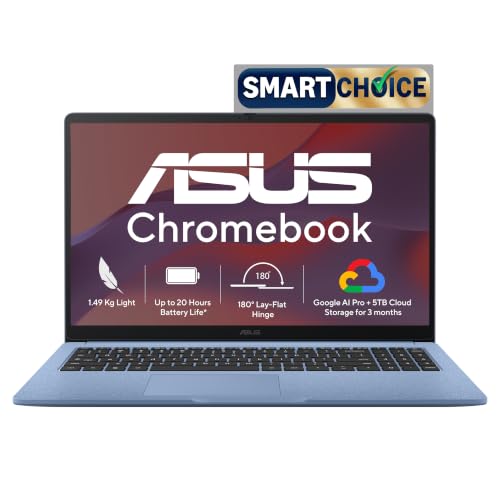
ASUS Chromebook CM1505 (2026), Smartchoice, MediaTek Kompanio 540 Processor, 4GB RAM, 128GB SSD, FHD, 15.6"(39.6 cm), 60Hz, Chrome OS, Fabric Blue, 1.49 Kg, CM1505CM4A-S70081, Thin & Light Laptop
- Processor, Memory & Storage : MediaTek Kompanio 540 2.0 GHz(1M Cache, up to 2.6GHz, 8 cores) | Memory : LPDDR5X 4GB RAM | Storage : 128G eMMC SSD
- Operating System & Software : Chrome OS
- Display & Graphics : 15.6-inch, FHD (1920 x 1080) 16:9, 300nits Brightness, Anti-glare display, 60Hz Refresh rate | Graphics : Integrated ARM Mali-G57 MC2
- Ports & Connectivity : 1x USB 3.2 Gen 1 Type-A, 2x USB 3.2 Gen 1 Type-C support display / power delivery, 1x HDMI 1.4, 1x 3.5mm Combo Audio Jack | Connectivity : Wi-Fi 6(802.11ax) (Dual band) 2*2 + Bluetooth 5.4 Wireless Card
The 14-inch Chromebook grown to 15.6 inches with double the storage.
Scored from published specifications against our open scoring rubric. Spec-derived, not a lab measurement — we tell you where every number comes from.
Same silicon, same 300-nit FHD panel, bigger body, and 128GB of storage instead of 64GB. Around ₹7,000 more. If it’s going to live on a desk rather than in a bag, the extra screen and double storage are worth it. If you’re carrying it daily, the 14-inch is the smarter buy.
The cheap one, with a warning

Acer Chromebook, MediaTek Kompanio 540 Octa-Core Processor, 4GB RAM, 64GB eMMC, Full HD, 11.6"/27.94cm Display, Chrome OS, Black, 1.2 KG, C725, Arm Mali G57 Graphics, WiFi 6E Laptop
- Chromebook laptops run on Chrome OS - An operating system by Google that is built for the way we live today. It updates automatically, boots up in seconds and continues to stay fast over time. This highly secure OS keeps your digital world protected.
- Processor, Memory & Storage : MediaTek Kompanio 540 Octa-Core processor, (2x Arm Cortex-A78 cores @ 2.6GHz) | Memory : 4GB RAM | Storage : 64GB eMMC
- Display & Graphics : 11.6-inch, IPS HD [1366*768] | 60Hz Refresh Rate
- Ports & Connectivity : 1x USB 3.2 Gen 1 Type-A, 1 x USB Type-C support, 1x Kensington Lock | Connectivity : Wi-Fi 6E + Bluetooth 5.3 Above
Cheapest entry, but the listing says Full HD in the title and 1366×768 in the specs.
Scored from published specifications against our open scoring rubric. Spec-derived, not a lab measurement — we tell you where every number comes from.
Around ₹20,000 gets you an 11.6-inch Chromebook — but note the display: 1366×768. The listing says “Full HD” in the title and then gives the real resolution in the specs. It isn’t FHD.
At 11.6 inches, 768p is tolerable in a way it never is at 15.6. This is a genuinely reasonable machine for a younger student or a pure secondary device. It is not a laptop to do a day’s work on. For ₹1,000 more, the 14-inch CM1405 is a dramatically better machine — that is the single best ₹1,000 you can spend in this entire price band.
What about the new Windows laptop, really?

Neopticon BrowseBook 15.6" FHD IPS Laptop | Best Student & Office Work Laptop | Celeron N4020 | 8GB RAM | 256GB SSD | Windows 11 | Num Pad | 38Wh | 1.5kg | Grey
- Full HD IPS Display: The 15.6-inch screen with 1920x1080 resolution delivers sharp and vibrant visuals, making it ideal for watching videos, browsing, and working on documents.
- 38Wh Long-Lasting Battery: The 5000mAh battery provides extended usage time, allowing you to work or enjoy entertainment for hours without needing to recharge frequently.
- Smooth Performance: Powered by the Intel Celeron N4020 processor clocked up to 2.8GHz, along with 8GB RAM and a 256GB SSD, this laptop ensures quick multitasking and fast program loading.
- Multiple Ports: Equipped with USB 3.0, Type-C, Mini HDMI, a Micro SD card slot, and a 3.5mm audio jack, it offers versatile connectivity options for all your devices and accessories.
A 2-core 2019 chip running an OS Microsoft does not list it as supported for.
Scored from published specifications against our open scoring rubric. Spec-derived, not a lab measurement — we tell you where every number comes from.
I’m including it because you will see machines like this and they look, on paper, like the obvious choice: 15.6-inch Full HD IPS, 8GB RAM, 256GB SSD, Windows 11, under ₹27,000. Every box ticked.
The box that isn’t ticked is the processor, and it’s the one that decides whether you enjoy using the thing. Two cores, two threads, 2019 silicon, not on Microsoft’s supported list for the OS it ships with. The 8GB of RAM cannot rescue a CPU that has run out of cores.
If your budget is genuinely fixed at ₹30,000 and you need Windows, the refurbished ThinkPad is the better answer — a 2018 business-class 4-core beats a 2019 entry-level dual-core comprehensively, and it’s cheaper.
How to decide, in three questions
- Do you actually need Windows software? Not “would I like Windows” — do you need a specific .exe? If no, buy the Chromebook. It’s a better machine in every physical respect.
- If yes, are you comfortable buying pre-owned? If yes, the refurbished ThinkPad is the best hardware here by a wide margin. Verify the seller’s rating and ask about battery health first.
- If you need Windows and refuse pre-owned — then honestly, save for another two months. ₹40,000 buys a new Ryzen 3 5400U machine with an IPS panel and upgradable RAM, and the gap between that and anything new at ₹30,000 is enormous.
Frequently asked questions
Is a refurbished laptop safe to buy?
From a seller with a real returns policy and volume of ratings, generally yes — business laptops are built for a five-year service life and most are retired at three. The two things to verify are battery health and warranty length. The chassis and keyboard on a T-series ThinkPad will comfortably outlast any new laptop at this price.
Can a Chromebook run Microsoft Office?
Office on the web, yes — Word, Excel and PowerPoint in a browser, free with a Microsoft account. Desktop Office, no, never. For most coursework the web versions are fine; for heavy Excel with macros they are not.
Is 4GB RAM enough on a Chromebook?
For 10–15 tabs and Android apps, yes. ChromeOS has a far smaller memory footprint than Windows and aggressively suspends background tabs. The same 4GB in a Windows laptop would be unusable — this is genuinely a case where the number means something different.
Is 8th-gen Intel too old in 2026?
It’s the oldest generation Microsoft supports for Windows 11, so it has a defined support life rather than an indefinite one. As raw capability, a 4-core/8-thread i5-8265U still comfortably outruns every new sub-₹30,000 chip. Think of it as buying the last generation with a guaranteed future rather than the first without one.
Can any of these game?
No. Not the Chromebooks, not the refurbished machines, not the Celeron. Cloud gaming works on the Chromebooks if your connection is good. Native PC gaming at this budget isn’t happening — anyone telling you otherwise is selling you something.
The bottom line on the best laptops under ₹30,000
₹30,000 is a price band where the honest answer is “buy a different kind of laptop than you were planning to.”
If your work lives in a browser, the ASUS Chromebook CM1405 is a better-built machine with a better screen than Windows laptops at twice the price, and I’d recommend it without hesitation to the right person.
If you need Windows, a refurbished ThinkPad T490 gives you four cores, a superb keyboard and a legitimate Windows 11 path for around ₹26,000 — provided you check the battery.
And if neither of those works for you, the most valuable thing I can say is: wait and buy at ₹40,000 instead. The step up from ₹30,000 to ₹40,000 is the single biggest jump in value anywhere in the Indian laptop market — and we’d rather tell you that than sell you a dual-core.
More TechWeu buying guides
Comments
Loading comments...


